• Keep your system and games updated
Ensure that your Switch 2 system firmware and all your games are up to date. Patches often include performance improvements or compatibility fixes.
• Optimise display and output settings
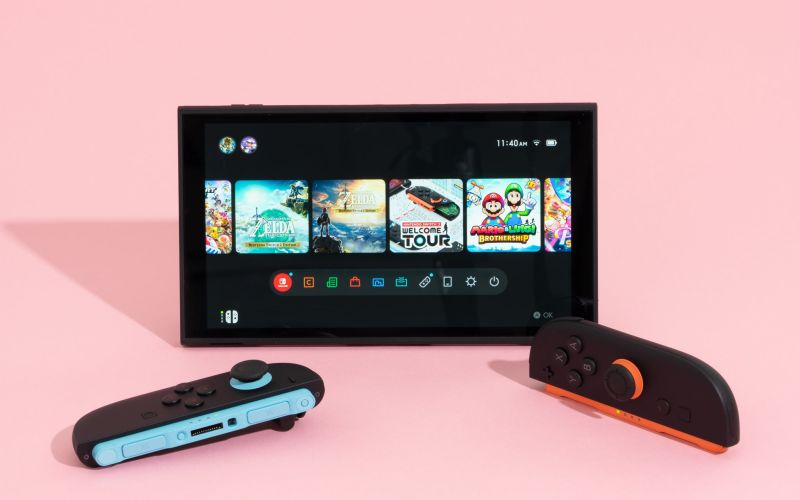
Switch two features a handheld screen with Full HD (1080p) resolution, a 7.9-inch panel, and supports up to 120 Hz in some instances.
When docked, it supports up to 4K output on compatible TVs.
Choosing the proper resolution and refresh rate for your display (TV or handheld) will help performance. For example, if your TV supports 4K but a game isn't optimised, sticking to 1080p might yield smoother frames.
• Reduce graphical strain to boost frame-rate
Although Switch 2’s hardware is upgraded, backwards compatibility means some older games may not be optimised to take full advantage of the new hardware.
If you prefer smoother gameplay over maximum visual fidelity, reducing output resolution (or choosing a “performance mode” if available) is a practical option.
• Ensure good ventilation and cooling
High performance can generate heat; keeping the console in a well-ventilated space helps avoid thermal throttling. Although this is a general tip, it still applies to hybrid consoles like the Switch 2.
How to Improve the Graphics on Switch 2
• Use HDR and high refresh rate where supported
Switch two supports HDR10 in both handheld and docked modes (depending on the game and display).
High refresh rates (up to 120 Hz) are supported in handheld mode for some titles.
If your display supports these features, enabling them can improve visual experience (provided the game is optimised).
• Choose games optimised for Switch 2 or wait for patches
Older games may run on Switch 2, but may not look as sharp unless optimised. For example, if a game was initially designed for 720p or lower resolution, playing it on a 1080p screen may reveal blurring or a lack of detail.
Some games will receive Switch-specific versions or free optimisation patches; selecting those ensures better graphics.
• Leverage AI upscaling and advanced rendering features
Switch 2 is reportedly capable of supporting AI upscaling (e.g., DLSS-like techniques) and ray tracing in some form, which can enhance visuals or improve perceived resolution.
Using a display that handles these features well (with good HDR and a high-quality panel) will make a noticeable difference.
• Use appropriate output modes and display gear
When docked, the console may output up to 4K (although not all games will utilise the full 4K resolution). Ensuring you have a quality HDMI cable and a TV or monitor that supports HDR and 4K will help you maximise the benefit.
In handheld mode, ensure screen brightness, contrast and panel cleanliness are managed—subtle but helpful.
• Use the best version of the game you own
If a “Switch 2 Edition” or “Optimised for Switch 2” version of a match exists, choose that over the generic, backwards-compatible version for superior graphics.
What Will Make Switch 2 Better?
• Developer optimisation and dedicated Switch 2 titles
Hardware capability is only one part of the story. Games that are developed specifically for Switch 2 (or patched to be optimised) will make the console feel better. This means higher resolution, higher frame rates, better textures, improved lighting, etc.
• Faster storage and better load times
Improved internal storage and faster I/O (as reported) mean reduced loading times and smoother transitions, which enhance the overall experience even if they do not directly improve in-game frame-rate.
• Better ecosystem and peripherals
The quality of the display (whether it's a TV or handheld screen), the dock, the HDMI cable, and other accessories all matter. A well-matched setup will help you see the full potential of Switch 2.
• Long-term software support and updates
Ongoing system updates, optimisation patches, and compatibility fixes from Nintendo will help Switch two improve over time.
• Making full use of both handheld and docked modes
Switch 2 retains its hybrid nature (handheld + docked). Leveraging both modes—portable for convenience, docked for maximum visual fidelity—allows you to get more from the console.
Summary
- To boost performance on your Switch 2, keep the system updated, select the correct resolution/refresh rate, ensure good cooling, and reduce strain when needed.
- To improve graphics: use games optimised for Switch 2, enable HDR and high refresh where possible, choose the correct display setup, and use the best version of the game.
• • Result in reduced loading times and smoother transitions, which enhance the overall experience even if they do not directly improve in-game frame rates
The above content is compiled by ModeZone, a fashion and entertainment magazine.