

After Apple released the first public beta of iOS 26.1, iPadOS 26.1, macOS 26.1, watchOS 26.1, and tvOS 26.1 on September 25, the company officially pushed the 26.1 update to all eligible devices yesterday.
Taking the MacBook Pro as an example, the update is about 4.7 GB, while the iPhone update package is about 4.74 GB. This version brings a large number of changes, essentially the same as the first iOS 26.1 developer beta. If you didn’t notice the update notification, you can also go to Settings → Software Update on your device to check for and install it manually.
iOS 26.1 feature upgrades
1.1 Expanded language support for Apple Intelligence
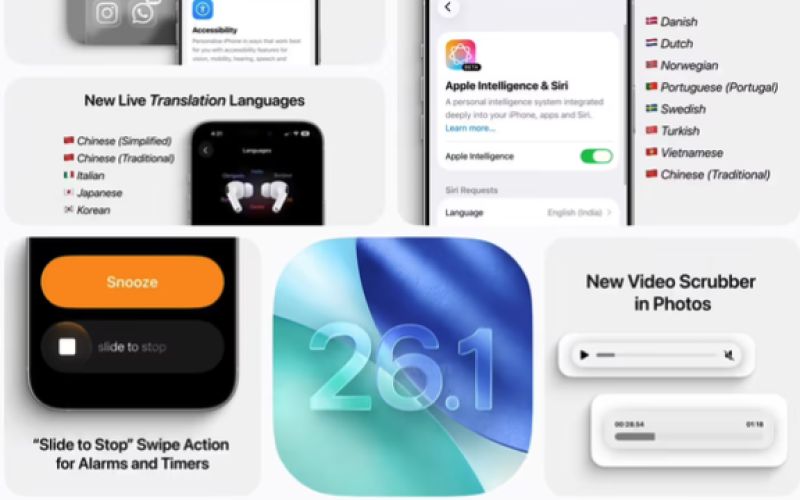
According to a blog post cited by ITHome, this update mainly adds support for the following languages in Apple Intelligence:
-
Danish
-
Dutch
-
Norwegian
-
Portuguese (Portugal)
-
Swedish
-
Turkish
-
Traditional Chinese
-
Vietnamese
This further expands the global availability of Apple Intelligence.
1.2 Upgraded real-time translation for AirPods
The Live Translation feature on AirPods has also been enhanced. It now supports:
-
Japanese
-
Korean
-
Italian
-
Chinese (both Traditional and Simplified)
This makes real-time cross-language communication more practical. Users can simply wear their AirPods and start two-way conversation translation instantly, suitable for travel, business, and many other scenarios.
1.3 Phone app improvements
The keypad in the Phone app now uses a new “liquid glass” design, offering a more crystalline visual look.
1.4 Apple Music
The new version improves interaction in Apple Music. Users no longer need to return to the playback controls; you can swipe left or right on the song title area to switch to the previous or next track.
1.5 Photos
The Photos app has been optimized with an improved scrubber/slider for browsing videos.
Apple has also adjusted the transparency of the navigation bar, making it easier to distinguish against light backgrounds.
1.6 Calendar
In the Calendar app, some views now display events from different calendars with full-color backgrounds.
1.7 Safari browser
In Safari, the bottom tab bar has been widened and the side padding reduced, improving tap accuracy and ease of switching between tabs.
1.8 Security mechanisms
In terms of security, “Rapid Security Responses” has been renamed to “Background Security Improvements.” This feature installs security enhancements and system files ahead of regular system updates. If any compatibility issues arise, these updates may be temporarily removed and refined in subsequent versions.
macOS 26.1 update contents
macOS Tahoe 26.1 does not bring many visible optimizations and improvements. Most changes are under the hood, including initial integration of support for Anthropic’s MCP protocol and the introduction of third-party model support for the Image Playground feature. Other improvements include:
2.1 Fixes
-
Background Assets: Fixed an issue where
Asset Pack Manager .url(for:)would unexpectedly throw an error after locating the URL for locally available asset files. -
Game Controller: Fixed an issue where
GCPressedStateInput.lastPressedStateTimestampreturned a timestamp in the wrong time domain. -
SwiftUI: Fixed a crash that occurred when using the
navigationLinkIndicatorVisibilitymodifier on iOS 17, iOS 18, and corresponding versions.
2.2 Known issues
-
Apple TV: In the Apple TV app on macOS, the search bar is missing.
-
sudo: Additional security checks have been added when loading the
/etc/sudoersconfiguration and files in the/etc/sudoers.dfolder. If the owner is not set toroot, the configuration will be ignored andsudomay not function properly.
Workaround: Use Recovery mode and runchown 0:0 /etc/sudoersto change the file owner back to the correct value.
3. watchOS 26.1 first public beta contents
watchOS 26.1 introduces to Apple Watch:
-
The liquid glass design
-
A Notes app
-
New swipe gestures
-
Apple Intelligence features
and other new capabilities.
4. iPadOS 26.1 first public beta contents
4.1 System UI
Apple has enhanced parts of the iPadOS 26.1 system UI.
4.2 Apple Music
Apple Music users can now use swipe gestures on the MiniPlayer in the iPad app to switch between tracks.
The above content is compiled by ModeZone, a fashion and entertainment magazine.