

Tech outlet NeoWin reported yesterday (October 29) that Microsoft has rolled out an update to its Office app suite for iPhone and iPad — including Word, Excel, and PowerPoint — featuring Apple’s new Liquid Glass design language and refreshed app icons.
Refreshed Interface and Design Language
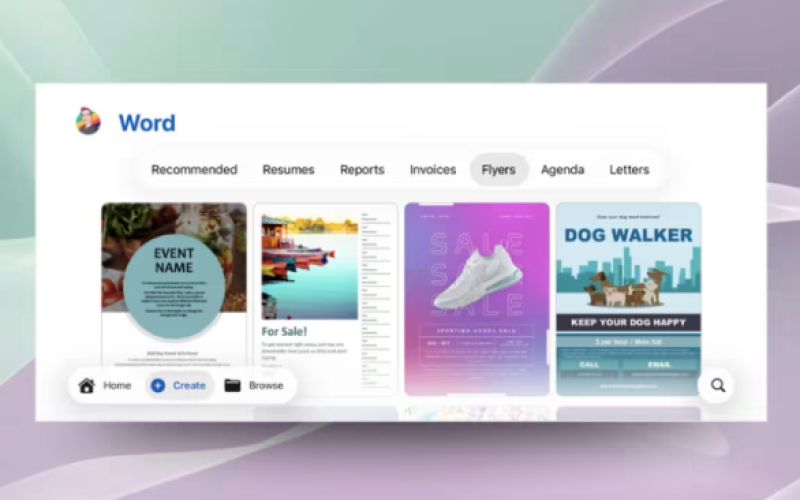
The core change in this update is the integration of Apple’s iOS/iPadOS 26 Liquid Glass design aesthetic. Microsoft has redesigned the floating bar containing the Home, Create, and Browse tabs, while also introducing brand-new icons across the suite for a more modern and cohesive visual experience.
To improve usability on smaller devices like the iPhone, the navigation bar has been moved from the top to the bottom of the screen. This change makes it easier for users to reach frequently used functions such as search and document creation with one hand, aligning the overall experience more closely with the native iOS 26 design style.
Enhanced Template Discovery
Beyond the visual overhaul, the update significantly improves the template discovery process. Previously, users had to scroll through long lists of templates. Now, after tapping Create, the app displays quick-access buttons like Flyers, Resumes, and Invoices, allowing users to instantly locate the desired template with a single tap — greatly boosting productivity when starting new professional documents from scratch.
Availability and Version Details
Users can experience the redesigned interface by updating Word, Excel, or PowerPoint to version 2.102 (Build 25101016) or later. The update is compatible with devices running iOS 26, iPadOS 26, and visionOS 26, bringing a unified, next-generation Office experience across Apple’s platforms.
The above content is compiled by ModeZone, a fashion and entertainment magazine.